Know which topics are actually sinking in
Every flashcard and MCQ you study is tagged by topic. BrightStudy turns those tags into a health score for each one, so you can see exactly what is Strong, what is Critical, and what to study next.
How topics work
A topic is a tag, not a folder you maintain
You never set up a topic list by hand. BrightStudy reads the tags already on your flashcards and MCQs and builds the picture from there.
Tags, not folders
A topic is any tag on a flashcard or MCQ, so the list grows as you study, not as you file things away.
Four tag levels
Topic, knowledge type, concept and micro-tag are set automatically when a flashcard or MCQ is created.
Every answer counts
A right answer scores every tag on that item up; a wrong answer scores them down.
No tags yet? Folders fill in
Until you have studied tagged material, BrightStudy uses your Vault’s top-level subjects instead.
One row, both methods
Flashcards and MCQs on the same topic merge into a single row, not two separate ones.
Five bands, from Strong to Critical
Every topic you have studied gets a band, worked out from its accuracy over the period you pick.
Strong
90% or more. Keep it ticking over.
Going well
75–89%. A little more practice to make it strong.
Developing
60–74%. Getting there. Worth a regular session.
Needs attention
45–59%. Results are slipping. Make it a priority.
Critical
Under 45%. Start here.
Not started / no data
Nothing studied yet, or nothing in the period you picked.
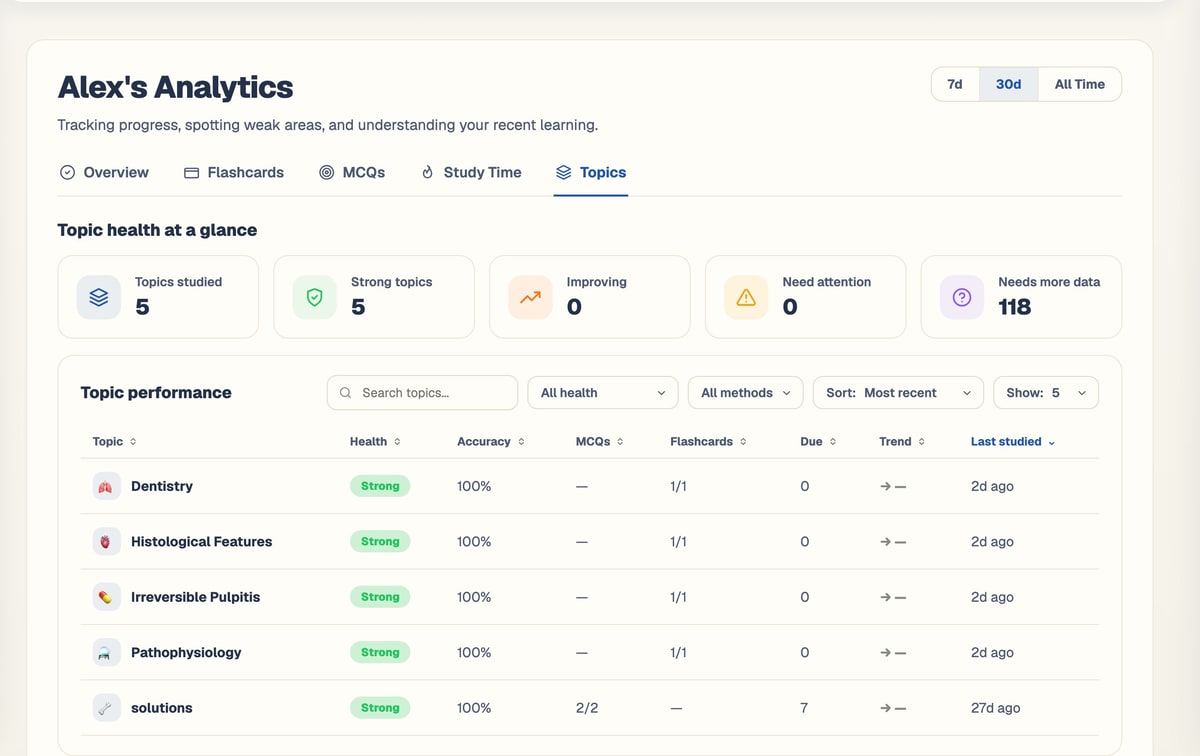
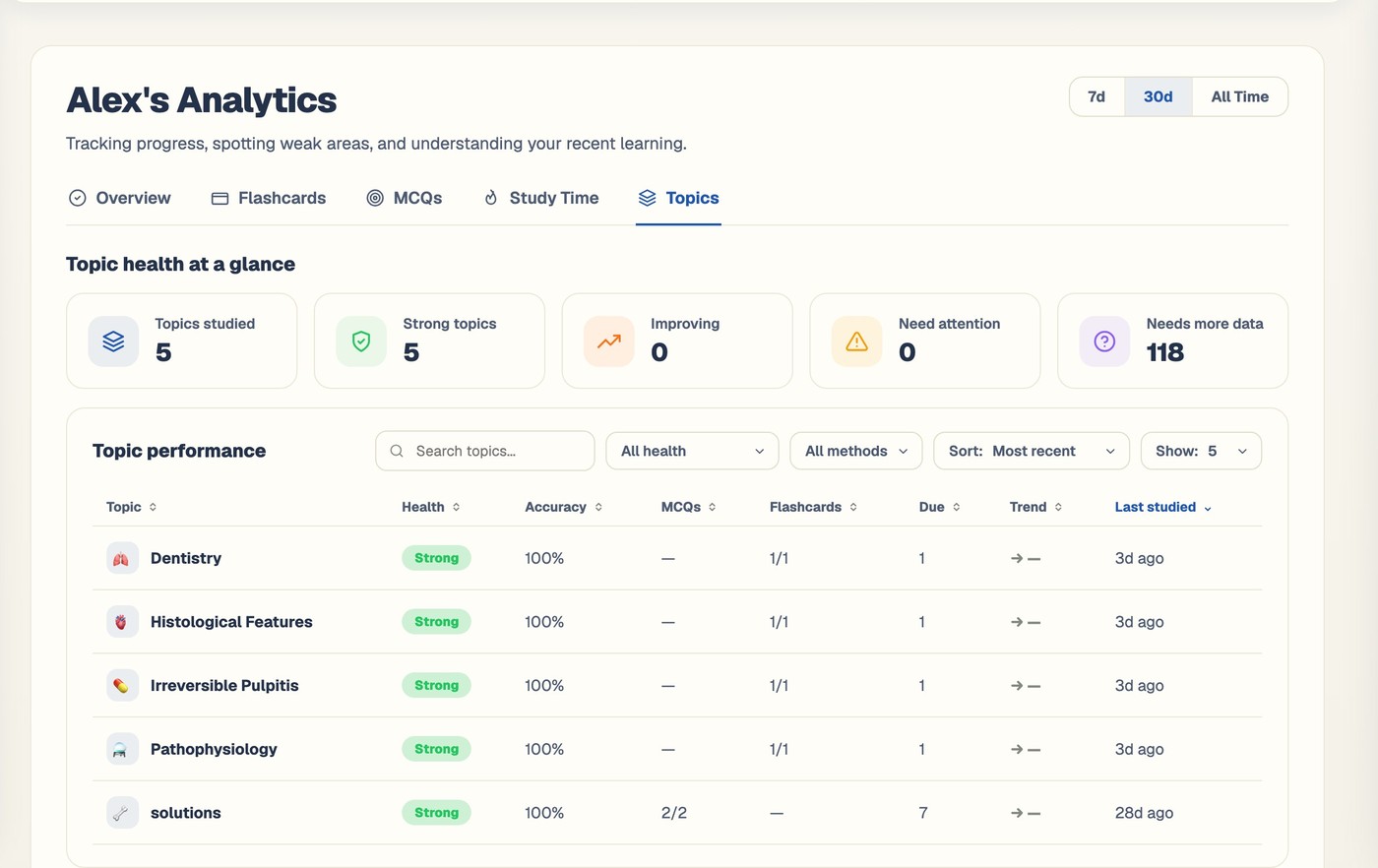
Every topic, in one sortable table
Search by name, filter by health or study method, then sort to find what needs you most.
Search, filter and sort by
Health & accuracy
- Health: one of five bands, Strong to Critical, or Not started / no data.
- Accuracy: your right-answer rate across flashcards and MCQs carrying that tag.
MCQs & flashcards
- MCQs: correct over attempted for that topic, in the period you picked.
- Flashcards: the same, from flashcard reviews.
Due & trend
- Due: how many items carrying that tag are due for review right now.
- Trend: accuracy up or down against the previous period of the same length.
Last studied
- The most recent flashcard review or MCQ answer carrying that tag.
How a topic’s health is actually worked out
Nothing is self-reported. Every number on the table comes from your real answers.
Every tag is scored
A right answer scores every tag on that item up by one; a wrong answer scores them down, across flashcards and MCQs alike.
Accuracy follows your range
Switch between 7 days, 30 days and all time, and accuracy, MCQs, flashcards and trend all recalculate for that window.
A band appears
90% or more is Strong; under 45% is Critical, with three bands in between.
Mastery tiers roll up too
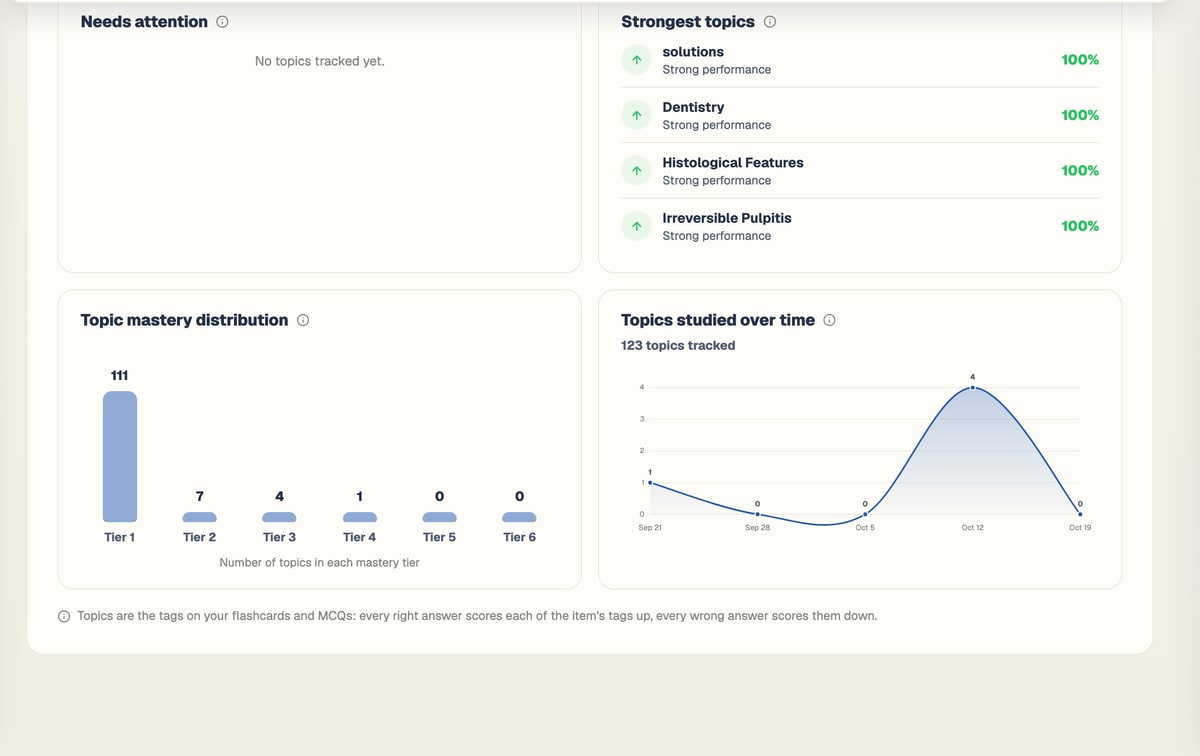
The same six mastery tiers behind your flashcards average into a per-topic distribution chart.
Topics, wherever you are studying
The full table lives in Analytics, and a lighter view sits on every document you study.
The topic table
Search, filter and sort every topic you have studied, with health, accuracy, due and trend side by side.
Needs attention & strongest
Your four weakest and four strongest topics, ready-ranked, without touching a filter.
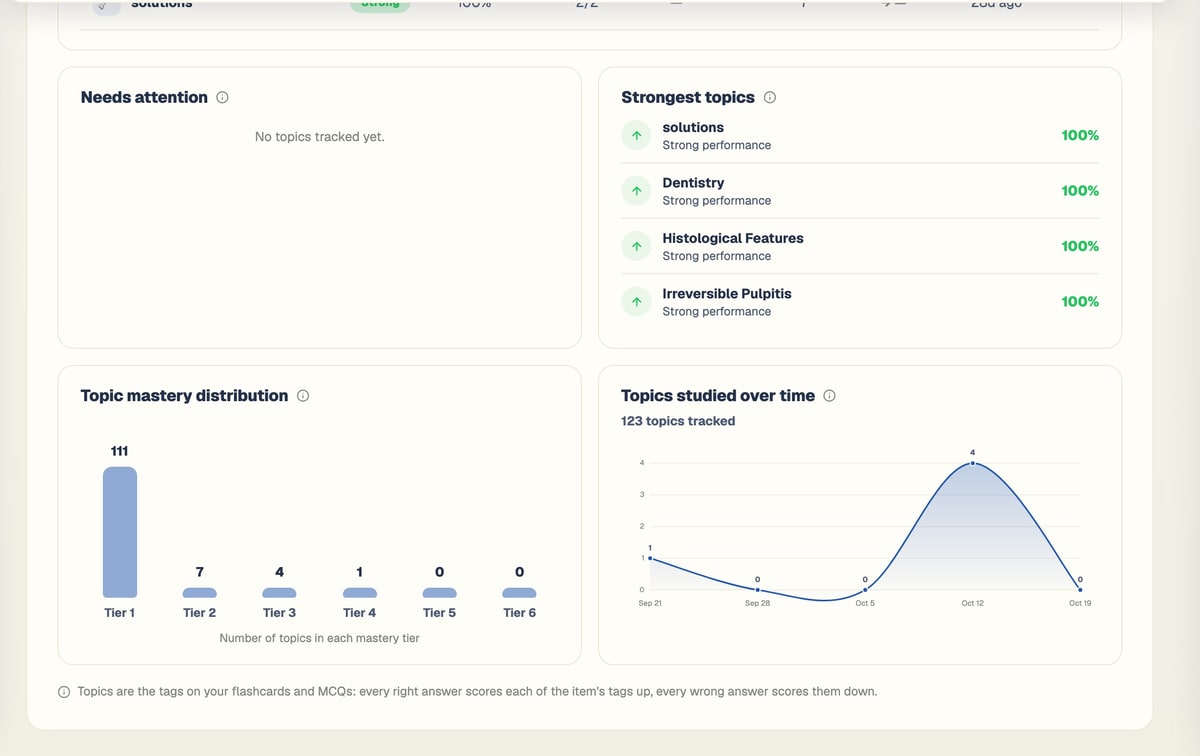
Mastery & trend charts
A mastery distribution across six tiers, and distinct topics studied over time.
Topics from this document
Every document gets its own topic grid, built from that document’s flashcard and MCQ tags, sorted by coverage or A–Z.
One document, or everything you have studied
Pick the view that matches the question you are actually asking.
Topics from this document
Choose it if
You just want to see what one document covers.
You get
A grid of its flashcard and MCQ tags, sorted by how much each is covered.
See how it works ↓The topic table
Choose it if
You want every topic across everything you study.
You get
Search, filter by health or method, and sort by any column.
See how it works ↓Needs attention / Strongest
Choose it if
You want the short version, no filtering.
You get
Your four weakest and four strongest topics, ready-ranked.
See how it works ↓AI study brief
Choose it if
You want to know what to actually do about it.
You get
Your weakest, most urgent topics turn into 3 to 5 next steps.
See how it works ↓From a tag to a plan, in five steps
You do not set any of this up. It builds itself as you study.
- 1
Upload your notes
Slides, PDFs, handwritten pages, recordings or a YouTube lecture.
- 2
Tags are added automatically
Flashcards and MCQs get a topic, knowledge type, concept and micro-tag as they are made.
- 3
Study as normal
Every review and every answer scores the tags on that item.
- 4
Topics take shape
Each one gets a health band and a mastery tier as results come in.
- 5
See what needs you
The topic table, and your AI study brief, point straight at what is weakest.
Your weakest topics drive what BrightStudy tells you to study
Behind the scenes, every topic also gets a readiness score from its documents’ test engagement and accuracy. Your dashboard’s AI brief reads that score alongside your upcoming exams and due reviews, then ranks what to study right now — see AI brief on the progress page for the full picture.
Questions, answered
How BrightStudy works out topic health, and where you will see it.
Try BrightStudy free and upload your first document, or email us at support@brightstudy.ai.
What counts as a "topic"?
How is topic health worked out?
What are the four tag levels, and do I have to add them myself?
Can I search, filter and sort the topic table?
What do accuracy, due and trend mean?
Where else do my topics show up?
Does this feed my AI study brief?
Is topic analysis on the Free plan?
Explore the rest of BrightStudy
Move across the strips · tap one to explore
 VaultDocuments, images and recordings in folders.Learn more →
 Progress AnalyticsTrack your study activity and performance.Learn more →
 Study CalendarPlan revision, exams, deadlines and events.Learn more →
 Study DocsStructured notes you can read, edit and study from.Learn more →
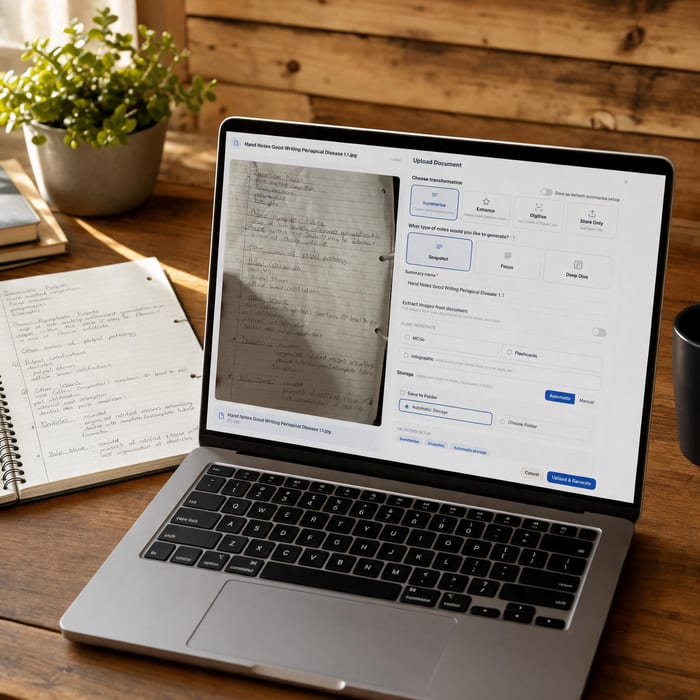 Document UploadsPDFs, slides and typed or handwritten notes.Learn more →
 YouTube LearningTurn video lessons into study materials.Learn more →
 RecordingsRecord or upload audio for your learning.Learn more →
Stop guessing what to revise.
Study, and let BrightStudy turn your own answers into a health score for every topic.
- Free plan to get started
- Study Docs, flashcards and MCQs
- Runs in your browser